Are you looking to master Microsoft Excel for work, business, or personal productivity? Whether you’re a beginner or an advanced user, having a comprehensive Excel guide can save you time and boost your efficiency.
That’s why we’ve created “The Ultimate Excel Handbook”—a free PDF packed with formulas, shortcuts, data analysis techniques, and pro tips to help you become an Excel expert!
Table Of Content
- Functions
- Top 10 Functions
- Text Splitting Functions
- Conditional Formatting
- Data Table
- Top 10 Excel Functions You Should Know in Financial Modeling
- Data Validation
- Group Data
- Power Query
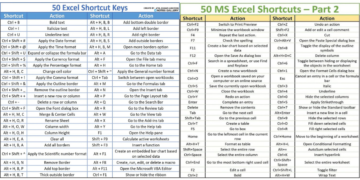
- Excel Cheatsheets
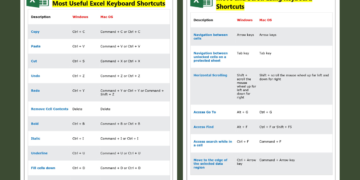
- Excel Shortcuts
- Mastering Large Data Sets
- Getting Started with Python in Excel
- How ChatGPT Can Simplify Excel Workflow?
- History of Microsoft Excel
📌 What’s Inside the Excel Handbook?






1️⃣ Excel Basics for Beginners
✔ Introduction to the Excel Interface
✔ Essential Keyboard Shortcuts
✔ Basic Formulas (SUM, AVERAGE, COUNT, etc.)
✔ Cell Formatting & Conditional Formatting
2️⃣ Intermediate Excel Skills
✔ VLOOKUP & HLOOKUP (with Examples)
✔ INDEX & MATCH – A Better Alternative to VLOOKUP
✔ PivotTables – Data Summarization Made Easy
✔ Data Validation & Drop-Down Lists
3️⃣ Advanced Excel Techniques
✔ Advanced Formulas (XLOOKUP, INDIRECT, OFFSET)
✔ Power Query – Automate Data Cleaning
✔ Macros & VBA for Automation
✔ Dynamic Dashboards & Interactive Charts
4️⃣ Excel for Business & Finance
✔ Financial Functions (NPV, IRR, PMT)
✔ Forecasting with Excel (Trend Analysis)
✔ Business Analytics with Power Pivot
✔ Solving Real-World Problems with Excel
5️⃣ Bonus: Excel Tips & Tricks
🔥 Hidden Excel Features You Didn’t Know
🚀 Time-Saving Keyboard Shortcuts
📊 How to Present Data Professionally
Your Excel Learning Roadmap: From Beginner to Advanced
The handbook covers every level. Use this roadmap to see where you are now and what to learn next. Each level lists the skills and a small project that proves you have them.
Level 1: Beginner (first 2–3 weeks)
- Navigate workbooks, sheets, cells and ranges; enter and format data.
- Basic formulas: SUM, AVERAGE, MIN, MAX, COUNT, simple arithmetic.
- Relative vs absolute references ($A$1) and AutoFill.
- Sort, filter, freeze panes, print setup.
- Basic column, line and pie charts.
Project: a personal monthly budget with totals, a difference column and a chart.
Level 2: Intermediate (next 1–2 months)
- Logical functions: IF, IFS, AND, OR, IFERROR.
- Conditional aggregation: SUMIFS, COUNTIFS, AVERAGEIFS.
- Lookups: XLOOKUP or INDEX/MATCH.
- Text and date functions: TRIM, TEXT, LEFT/RIGHT, TEXTJOIN, EOMONTH, NETWORKDAYS.
- Excel Tables (Ctrl + T), PivotTables, slicers and conditional formatting.
- Data validation drop-downs.
Project: a sales report that summarises raw transactions by region and month with a PivotTable and an interactive slicer.
Level 3: Advanced (2–4 months of regular use)
- Dynamic arrays: FILTER, SORT, UNIQUE, SEQUENCE; LET for readable formulas.
- Power Query for importing and cleaning data; Power Pivot and the data model for larger datasets.
- What-If Analysis: Goal Seek, Data Tables, Scenario Manager, Solver.
- Dashboards with PivotCharts and slicers.
- Workbook protection, documentation and error checks.
Project: a refreshable dashboard fed by Power Query from monthly CSV files.
Level 4: Expert and specialist
- Financial modelling (three-statement models, DCF) or statistical analysis, depending on your field.
- Automation with VBA macros or Office Scripts; custom functions with LAMBDA.
- Performance tuning of large models and model review techniques.
Project: a complete model or automated report that someone else can use without your help.
How to learn faster
- Practise on data from your own job or interests. It sticks far better than textbook examples.
- Learn the keyboard shortcuts early; they compound over time.
- Rebuild something you see in a tutorial from scratch without looking.
- Keep the handbook PDF as a reference rather than reading it cover to cover.
Frequently Asked Questions
How long does it take to become advanced in Excel?
With regular practice, most people reach an intermediate level in one to two months and an advanced level in four to six months. Daily use at work speeds this up considerably.
Is the Microsoft Office Specialist (MOS) Excel certification worth it?
It can help on a CV, especially early in your career, because it proves a verified skill level. Employers will still test practical skills, so focus on real projects too.
Related guides
- The Ultimate Excel Handbook V3 PDF
- Excel Fundamentals PDF
- Microsoft Excel Advanced Participant Guide PDF
📥 Download Your Free Excel Handbook PDF
🔗 Click Here to Download The Ultimate Excel Handbook
🎯 Who Is This Guide For?
✔ Students – Excel is essential for academics & research
✔ Job Seekers – Stand out in interviews with Excel skills
✔ Professionals – Finance, Marketing, HR, Data Analysis
✔ Entrepreneurs – Manage budgets & business data efficiently