Introduction
Excel formulas are an indispensable tool for anyone who works with data. Whether you’re a beginner or an experienced user, having a handy reference can be incredibly useful.
This Cheat Sheet will introduce you to an essential resource: an Excel Formulas Cheat Sheet PDF that you can download for free. This comprehensive guide will help you enhance your Excel skills and efficiency.
Overview of the Document
The Excel Formulas Cheat Sheet PDF is meticulously crafted to serve as an all-in-one reference. It includes a wide range of formulas, from basic arithmetic operations to more advanced functions.
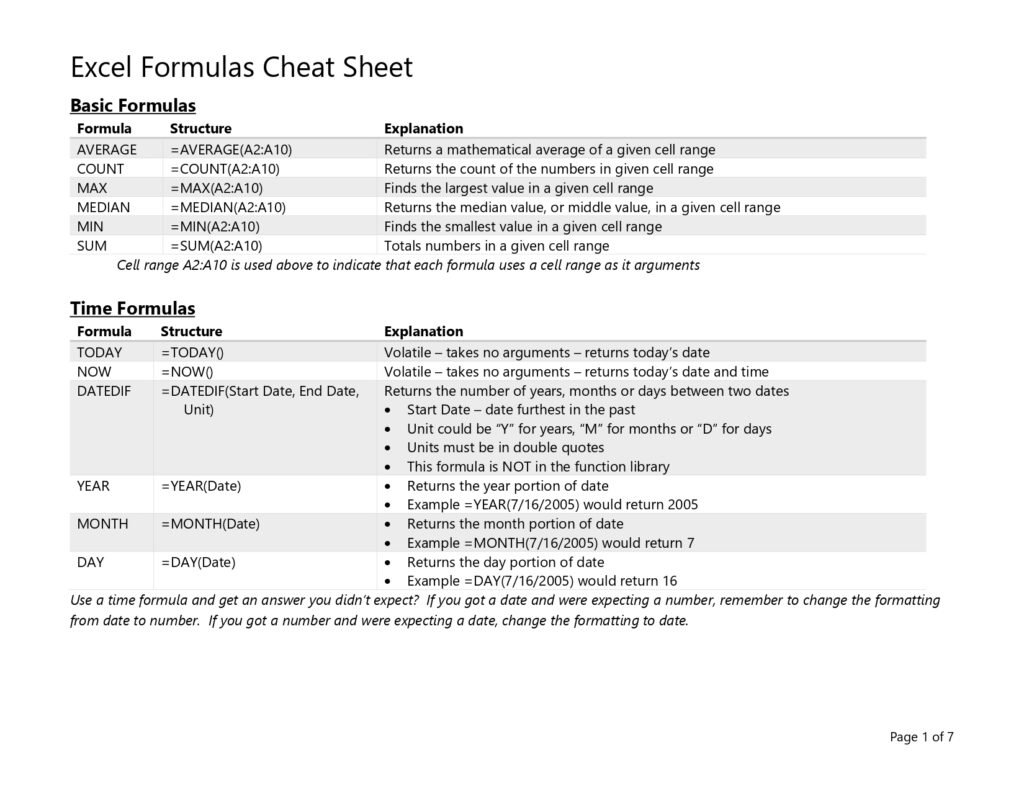


This document is designed to be user-friendly, making it easy to find exactly what you need without wasting time. Whether you’re dealing with complex data analysis or everyday calculations, this cheat sheet has you covered.
The Content
The cheat sheet is divided into several sections for ease of use. It starts with basic formulas like SUM, AVERAGE, and COUNT, and then moves on to more complex functions like VLOOKUP, HLOOKUP, and INDEX MATCH.
Each formula is explained with syntax and practical examples to help you understand how to use them effectively. It also includes tips and tricks to optimize your workflow and make the most out of Excel’s powerful features.
Why the Document
Having a cheat sheet can save you a lot of time and effort. Instead of searching for formulas online every time you need them, you can have all the information you need in one place.
This Excel Formulas Cheat Sheet PDF is perfect for quick reference, ensuring that you can complete your tasks more efficiently. It’s especially useful for those who are preparing for exams or certifications, as well as professionals looking to refresh their knowledge.
Excel Formulas Cheat Sheet: The Essentials at a Glance
Here is a condensed online version of the cheat sheet, with the syntax and a real example for each formula. Copy the examples into a blank workbook to see how they behave.
Math and statistics formulas
| Formula | Syntax | Example and result |
|---|---|---|
| SUM | =SUM(range) | =SUM(B2:B10) adds all values in B2:B10 |
| SUMIF | =SUMIF(range, criteria, [sum_range]) | =SUMIF(A2:A10,"East",C2:C10) totals sales for the East region |
| SUMIFS | =SUMIFS(sum_range, range1, criteria1, ...) | =SUMIFS(C2:C10,A2:A10,"East",B2:B10,">100") |
| AVERAGE | =AVERAGE(range) | =AVERAGE(C2:C10) |
| COUNT / COUNTA | =COUNT(range) / =COUNTA(range) | Count numbers only / count all non-empty cells |
| COUNTIF / COUNTIFS | =COUNTIF(range, criteria) | =COUNTIF(D2:D50,"Paid") |
| MAX / MIN | =MAX(range) | =MAX(C2:C10) returns the largest value |
| ROUND | =ROUND(number, digits) | =ROUND(3.14159,2) returns 3.14 |
Logical formulas
| Formula | Syntax | Example |
|---|---|---|
| IF | =IF(test, value_if_true, value_if_false) | =IF(C2>=50,"Pass","Fail") |
| IFS | =IFS(test1, value1, test2, value2, ...) | =IFS(C2>=90,"A",C2>=80,"B",TRUE,"C") |
| AND / OR | =AND(test1, test2) | =IF(AND(B2>0,C2>0),"OK","Check") |
| IFERROR | =IFERROR(value, value_if_error) | =IFERROR(B2/C2,0) avoids #DIV/0! |
Lookup formulas
| Formula | Syntax | Example |
|---|---|---|
| VLOOKUP | =VLOOKUP(lookup, table, col_num, FALSE) | =VLOOKUP(F2,A2:D100,3,FALSE) |
| XLOOKUP | =XLOOKUP(lookup, lookup_array, return_array, [if_not_found]) | =XLOOKUP(F2,A2:A100,C2:C100,"Not found") |
| INDEX + MATCH | =INDEX(return_range, MATCH(lookup, lookup_range, 0)) | =INDEX(C2:C100,MATCH(F2,A2:A100,0)) |
Tip: always use FALSE (exact match) as the last VLOOKUP argument unless you deliberately want an approximate match on sorted data. XLOOKUP defaults to exact match and can look to the left, which is why it is replacing VLOOKUP in Microsoft 365 and Excel 2021+.
Text formulas
| Formula | What it does | Example |
|---|---|---|
| LEFT / RIGHT / MID | Extract characters | =LEFT(A2,3) first three characters |
| LEN | Count characters | =LEN(A2) |
| TRIM | Remove extra spaces | =TRIM(A2) |
| UPPER / LOWER / PROPER | Change case | =PROPER("john smith") returns John Smith |
| TEXTJOIN | Join text with a delimiter | =TEXTJOIN(", ",TRUE,A2:A5) |
| TEXT | Format a number as text | =TEXT(B2,"dd-mmm-yyyy") |
Date formulas
| Formula | What it does | Example |
|---|---|---|
| TODAY / NOW | Current date / date and time | =TODAY() |
| YEAR / MONTH / DAY | Extract part of a date | =YEAR(A2) |
| EOMONTH | Last day of a month | =EOMONTH(A2,0) |
| NETWORKDAYS | Working days between two dates | =NETWORKDAYS(A2,B2) |
| DATEDIF | Difference in years, months or days | =DATEDIF(A2,TODAY(),"Y") returns age in years |
Dynamic array formulas (Microsoft 365 and Excel 2021+)
| Formula | What it does | Example |
|---|---|---|
| FILTER | Return the rows that meet a condition | =FILTER(A2:D100,C2:C100>1000) |
| SORT | Sort a range | =SORT(A2:B20,2,-1) sorts by column 2, descending |
| UNIQUE | List distinct values | =UNIQUE(A2:A100) |
| SEQUENCE | Generate a list of numbers | =SEQUENCE(12) returns 1 to 12 |
Relative vs absolute references
When you copy a formula, relative references such as A1 shift with it, while absolute references such as $A$1 stay fixed. Use mixed references ($A1 or A$1) to lock only the column or only the row. Press F4 while editing a reference to cycle through the four options.
Common formula errors and how to fix them
| Error | Usual cause | Fix |
|---|---|---|
| #N/A | Lookup value not found | Check spelling and extra spaces (TRIM), or use IFERROR / XLOOKUP’s if_not_found |
| #VALUE! | Wrong data type, e.g. text in a math formula | Convert text numbers with VALUE or check the inputs |
| #REF! | A referenced cell was deleted | Undo the deletion or rebuild the reference |
| #DIV/0! | Division by zero or an empty cell | Wrap with IFERROR or test the divisor with IF |
| #NAME? | Misspelled function or range name | Check the function name and quotes around text |
| #SPILL! | A dynamic array result is blocked by other data | Clear the cells where the result needs to spill |
Frequently Asked Questions
Which Excel formulas should a beginner learn first?
Start with SUM, AVERAGE, IF, COUNTIF, VLOOKUP or XLOOKUP, and TRIM. These cover most everyday tasks. Then move on to SUMIFS, INDEX/MATCH and the date functions.
Is XLOOKUP better than VLOOKUP?
In most cases, yes. XLOOKUP is exact-match by default, can return values from columns to the left, does not break when you insert columns, and has a built-in “if not found” argument. It is available in Microsoft 365 and Excel 2021 or later.
Can I print this Excel formulas cheat sheet?
Yes. Use the download link below to get the PDF version, which is formatted for printing.
Related guides
- Microsoft Excel Formulas Cheat Sheet PDF
- Excel Formulas Bible PDF
- 20 Essential Excel Formulas for Data Analysts
- MS Excel Shortcuts PDF
Conclusion
Excel is a versatile tool that offers a multitude of functionalities through its various formulas. By downloading this Excel Formulas Cheat Sheet PDF, you’ll have a valuable resource that can help you navigate through your data tasks with ease. It’s a must-have for anyone who wants to be proficient in using Excel.
Download PDF
Ready to boost your Excel skills? Download the Excel Formulas Cheat Sheet PDF now and make your data management tasks simpler and more efficient. Don’t miss out on this free, indispensable resource!