Whether you’re an aspiring finance professional, business owner, or investor, mastering financial modeling is one of the most valuable skills you can develop. Our comprehensive Financial Modeling Handbook (free PDF download) gives you step-by-step guidance—from basic concepts to advanced valuation techniques.
💡 Why Learn Financial Modeling?
✔ Boost Your Career – Essential for investment banking, private equity, and corporate finance roles
✔ Make Smarter Business Decisions – Forecast growth, assess risks, and optimize strategies
✔ Invest Like a Pro – Value stocks, startups, or entire companies with confidence
🎯 Who Needs This Guide?
- Finance Professionals (Analysts, Accountants, CFOs)
- Entrepreneurs & Business Owners (Plan funding needs, growth strategies)
- Investors (Evaluate stocks, startups, or M&A opportunities)
- Students (Ace finance courses and interviews)


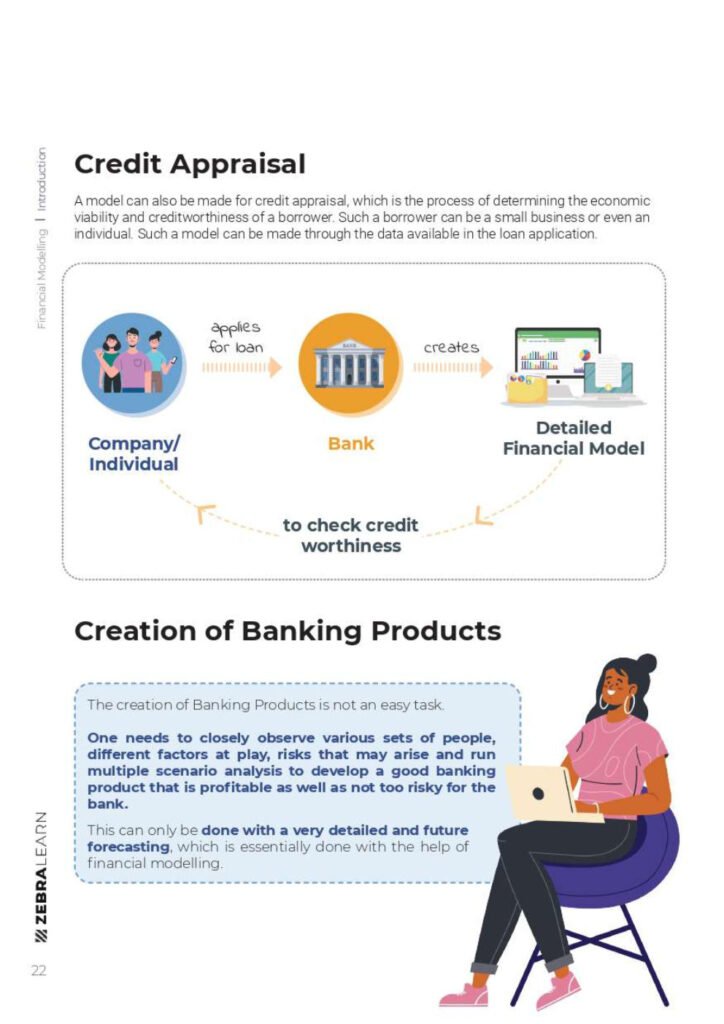
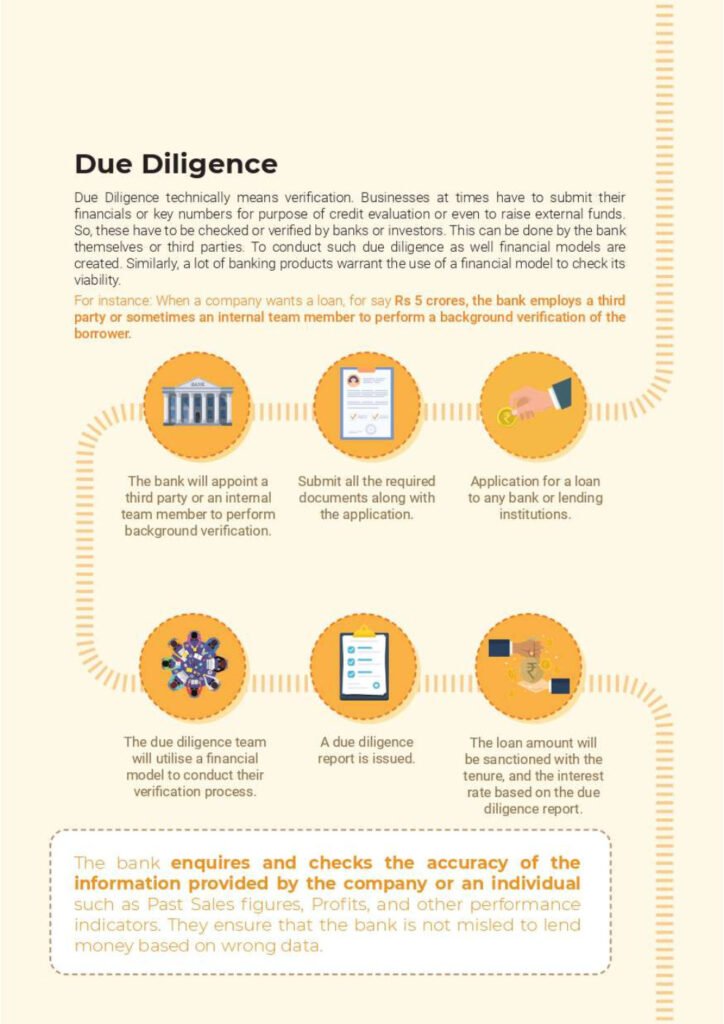




Table Of Content
1. Introduction to Financial Modelling
- 1.1 What is a financial model?
- 1.2 Who uses financial modelling?
2. Basics of Financial Modelling
- 2.1 Building the right mindset
- 2.2 Follow principles, not rules
- 2.3 Be realistic (neither conservative nor aggressive)
- 2.4 You will never know everything
- 2.5 Scenario Analysis
3. Core Concepts
- 3.1 Financial Statements
- 3.2 Data handling techniques
- 3.3 Time Value of Money
- 3.4 Key TVM terms
- 3.5 Understanding Free Cash Flows
- 3.6 Types of Free Cash Flows
- 3.7 WACC (Weighted Average Cost of Capital)
- 3.8 Estimating cost of equity using CAPM
- 3.9 Discounted Cash Flows
- 3.10 Key DCF terms
- 3.11 Types of Valuation Methods
4. Business Understanding
- 5.1 Company life cycle stages
- 5.2 Transaction-specific models
- 5.3 Business analysis fundamentals
- 5.4 Industry research basics
- 5.5 Competitive positioning
- 5.6 Product life cycle
- 5.7 Capital intensity assessment
- 5.8 Seasonality factors
- 5.9 Working/Fixed capital requirements
5. Model Construction
- 6.1 Historical data normalization
- 6.2 Profit & Loss statement
- 6.3 Balance Sheet
- 6.4 Cash Flow Statement
- 6.5 Financial statement analysis
6. Forecasting Techniques
- 7.1 Model assumptions
- 7.2 Revenue forecasting
- 7.3 Cost forecasting
- 7.4 Balance Sheet forecasting
- 8.1 Working Capital assets
- 8.2 Long-term liabilities
- 8.3 Current liabilities
- 8.4 Shareholder’s equity
- 8.5-8.7 Cash flow forecasting (Operating/Investing/Financing)
- 8.8 Balance Sheet reconciliation
7. Valuation Methods
- 9.1 Discounting cash flows
- 9.2 WACC-based valuation
- 9.3 WACC calculation
- 9.4 Enterprise Value
- 9.5 DCF valuation
- 10.1 Relative valuation concepts
- 10.2 Consensus valuation
8. Conclusion & Supporting Materials
- Conclusion
- Disclaimer
- Credits
Financial Modeling Explained: A Practical Primer
Before you open the handbook, it helps to see the big picture. This primer walks through what a financial model actually is, how the three financial statements connect, the Excel functions you will use most, and a complete worked DCF example you can rebuild in a spreadsheet in about ten minutes.
What is a financial model?
A financial model is a spreadsheet that represents a company’s past performance and forecasts its future results, usually as a set of linked financial statements. Analysts use models to answer concrete questions: How much is this business worth? Can it repay a loan? What happens to profit if sales fall 10%? How much funding does a startup need to reach break-even?
Most models share the same building blocks: an assumptions sheet (growth rates, margins, interest rates), the historical financial statements, the forecast, and an output section such as a valuation, a credit analysis or a scenario summary.
How the three financial statements link together
The heart of most models is the “three-statement model”. Understanding how the statements feed each other is the single most important concept for beginners and undergraduate students.
| Statement | What it shows | Key link to the other statements |
|---|---|---|
| Income Statement (P&L) | Revenue, costs and profit over a period | Net income flows to retained earnings on the balance sheet and is the starting line of the cash flow statement |
| Balance Sheet | Assets, liabilities and equity at a point in time | Changes in working capital, fixed assets and debt drive the cash flow statement |
| Cash Flow Statement | Cash generated and used in operating, investing and financing activities | Ending cash becomes the cash balance on the balance sheet |
A simple check proves the model works: total assets must equal total liabilities plus equity in every period. If the balance sheet does not balance, a link is missing somewhere.
Building a basic three-statement model in Excel: step by step
- Collect three to five years of historical statements from annual reports and lay them out in columns, one year per column.
- Create an assumptions block at the top or on its own sheet: revenue growth, gross margin, operating expenses as a % of revenue, tax rate, capex, depreciation and working-capital days.
- Forecast the income statement: revenue first (e.g.
=C5*(1+$C$2)where C2 holds the growth rate), then costs as a percentage of revenue, then interest and tax. - Forecast the balance sheet: receivables, inventory and payables from working-capital days; fixed assets with a PP&E roll-forward (opening + capex − depreciation = closing).
- Build the cash flow statement from net income, adding back depreciation and adjusting for changes in working capital, capex and financing.
- Link ending cash from the cash flow statement back into the balance sheet.
- Add a balance check row, e.g.
=ROUND(TotalAssets-TotalLiabilitiesAndEquity,2), which should show 0 in every column.
Excel functions every financial modeler uses
| Function | What it does | Example |
|---|---|---|
| NPV | Present value of a series of future cash flows at a constant rate | =NPV(10%,C2:G2) |
| XNPV | Like NPV but uses actual dates, so irregular periods are handled correctly | =XNPV(10%,B2:G2,B1:G1) |
| IRR / XIRR | The discount rate at which NPV equals zero | =IRR(B2:G2) |
| PMT | Periodic payment on a loan | =PMT(6%/12,60,-100000) |
| INDEX + MATCH / XLOOKUP | Pull the right assumption or scenario into the model | =XLOOKUP(H1,A2:A4,B2:B4) |
| CHOOSE | Switch between base, bull and bear cases with one cell | =CHOOSE($B$1,C5,D5,E5) |
| IFERROR | Keep error values out of outputs | =IFERROR(C5/C6,0) |
Worked example: a simple DCF valuation
A discounted cash flow (DCF) valuation values a business as the present value of the cash it will generate. Here is a complete example with round numbers.
Step 1 – Estimate the discount rate (WACC). Suppose the cost of equity from CAPM is risk-free rate 4% + beta 1.2 × market risk premium 5% = 10%. If the company is financed 60% by equity at 12% and 40% by debt at 6% with a 25% tax rate, then WACC = 0.6 × 12% + 0.4 × 6% × (1 − 25%) = 7.2% + 1.8% = 9.0%. The example below uses a 10% discount rate (the cost of equity above, as if the company had no debt) to keep the arithmetic simple.
Step 2 – Forecast free cash flow. Free cash flow to the firm = EBIT × (1 − tax rate) + depreciation − capex − increase in working capital. Assume it is 100 in year 1 and grows 10% a year.
| Year | 1 | 2 | 3 | 4 | 5 |
|---|---|---|---|---|---|
| Free cash flow | 100.0 | 110.0 | 121.0 | 133.1 | 146.4 |
| Discount factor at 10% | 0.909 | 0.826 | 0.751 | 0.683 | 0.621 |
| Present value | 90.9 | 90.9 | 90.9 | 90.9 | 90.9 |
Step 3 – Terminal value. After year 5, assume growth slows to 3% forever. Using the Gordon growth formula, terminal value = FCF5 × (1 + g) ÷ (WACC − g) = 146.41 × 1.03 ÷ (0.10 − 0.03) ≈ 2,154.3. Discounted back five years: 2,154.3 ÷ 1.15 ≈ 1,337.7.
Step 4 – Enterprise value. 454.5 (sum of the five present values) + 1,337.7 = ≈ 1,792. Subtract net debt to get equity value, then divide by the number of shares for a value per share.
Notice that about 75% of the value comes from the terminal value. That is normal for a DCF, and it is why the long-term growth rate and the discount rate deserve the most scrutiny in any model.
Best practices that make models easy to trust
- Colour-code cells: blue font for hard-coded inputs, black for formulas, green for links to other sheets.
- Never type numbers inside formulas. Put every assumption in its own labelled cell and reference it.
- Keep one formula per row across all forecast columns so the logic is consistent.
- Build checks (balance sheet balances, cash never negative, sources equal uses) and show them on the summary page.
- Run scenarios with Data Tables or a CHOOSE switch so decision-makers see a range, not a single number.
- Document sources for historical data and the reasoning behind each key assumption.
Common mistakes to avoid
- Growth rates that stay high forever, which inflate the terminal value.
- Mixing nominal and real figures, or mixing pre-tax and post-tax discount rates.
- Forgetting the working-capital investment that growth requires.
- Circular references from interest calculations left unmanaged. Use an on/off switch or a prior-period average balance.
Frequently Asked Questions
Is this financial modeling guide suitable for undergraduate students?
Yes. The handbook starts with the basics (what a model is, the three statements, the time value of money) before moving to DCF and relative valuation, so it works well alongside an undergraduate corporate finance or accounting course.
Do I need advanced Excel to start financial modeling?
No. Comfort with cell references, SUM, IF, basic lookups and NPV/IRR is enough to build your first model. Our 100 most important Excel functions and Excel formulas for finance grads guides cover what you need.
What is the difference between a DCF and relative valuation?
A DCF values a company from its own forecast cash flows (intrinsic value). Relative valuation compares it with similar companies using multiples such as EV/EBITDA or P/E. Professionals usually use both and compare the results.
How long does it take to learn financial modeling?
Most learners can build a basic three-statement model after a few weeks of practice. Becoming fast and confident with complex transaction models (LBOs, M&A) usually takes several months of hands-on work.
Related guides
- Financial Analysis Using Excel PDF
- 31 Top Finance Cheat Sheets PDF
- Finance Excel Guidelines for Accountants
- Excel Cheat Sheet for Accountants PDF