Introduction
In the realm of data analysis and management, Microsoft Excel stands as an indispensable tool. Whether you’re a novice or a seasoned professional, having a comprehensive guide can significantly enhance your productivity. We’re excited to introduce our latest offering: the Microsoft Excel Manual PDF, a detailed document designed to help you master Excel.
Overview of the Document
The Microsoft Excel Manual PDF is a meticulously crafted guide that covers a wide range of Excel functionalities. From basic operations to advanced features, this manual aims to be your go-to resource. It is structured to cater to different proficiency levels, ensuring that everyone finds it useful.




The Content
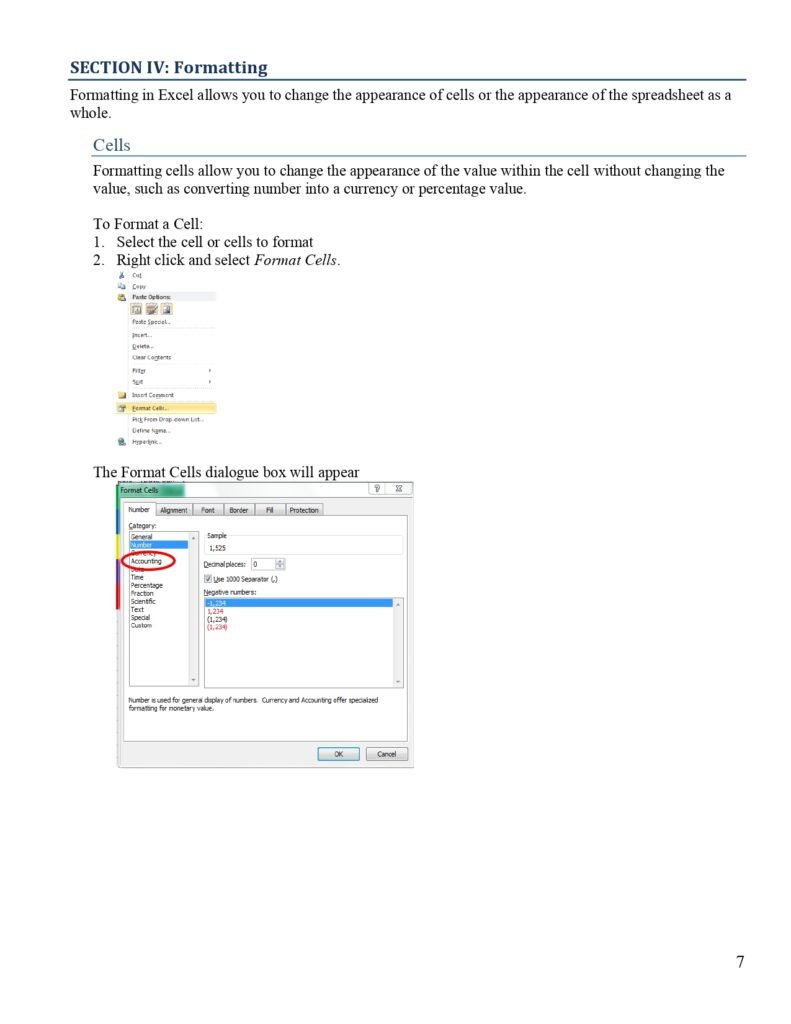
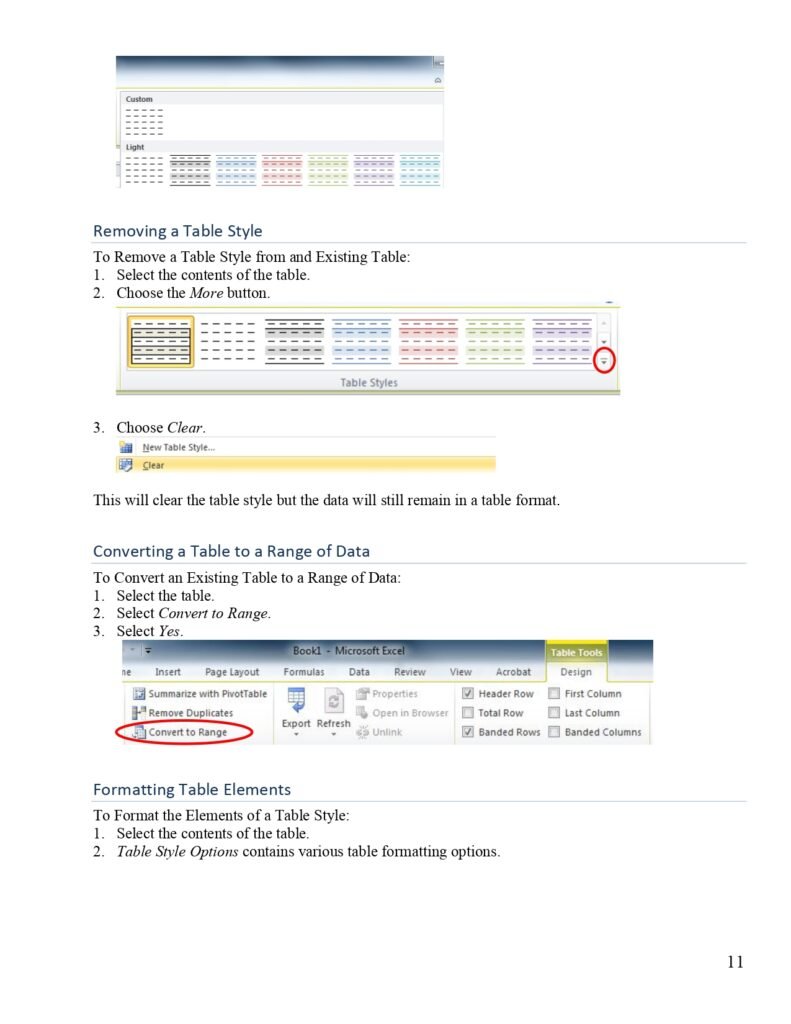
The manual is divided into several sections, each focusing on specific aspects of Excel. You’ll find chapters on data entry, formula creation, data analysis, and visualization. Additionally, the document includes practical exercises and examples to help you apply what you’ve learned. Whether you’re looking to understand pivot tables or seeking tips on using Excel’s built-in functions, this manual has got you covered.
Table of Contents
- Section I: What Is Excel?
- What Can I Do With This?
- Section II: Cells, Rows, And Columns
- What Is A Cell?
- What Are Rows And Columns?
- Inserting Rows And Columns
- Section III: Navigation
- Moving Between Cells
- Selecting Multiple Cells
- Selecting Entire Rows And Columns
- Selecting Multiple Rows And Columns
- Section IV: Formatting
- Cells
- Tables
- Choosing A Table Style To Create A Table
- Adjust The Table Style
- Creating Or Deleting A Custom Table Style
- Removing A Table Style
- Converting A Table To A Range Of Data
- Formatting Table Elements
- Pivot Tables
- Conditional Formatting
- Highlight Cells Rules
- Greater Than
- Less Than
- Between
- Equal To
- Text That Contains
- A Date Occurring
- Duplicate Values
- Top/Bottom Rules
- Top 10 Items
- Top 10%
- Above Average
- Data Bars
- Color Scales
- New Rule
- Clear Rules
- Manage Rules
- Section V: Separating Text Within A Cell
- Section VI: Sorting
- Alphabetical
- Numerically
- Multi-Level Sorting
- Sorting By Cell Color
- Section VII: Filters
- Section VIII: Functions And Formulas
- Basic Functions/Formulas
- Sums
- Subtotaling
- One Level Subtotals
- Nested Level Subtotals
- Removing Subtotals
- Average
- Count Numbers
- Maximum And Minimum
Why the Document?
This Microsoft Excel Manual PDF is not just another guide. It is a comprehensive, easy-to-understand resource that aims to make you proficient in Excel. By downloading this manual, you gain access to a wealth of knowledge that can streamline your workflow and improve your data management skills. The document is designed to be user-friendly, making complex topics accessible to everyone.
Excel Reference: Versions, File Formats and Key Limits
A manual is most useful when you know which version of Excel you are using and what it can do. This reference section answers the questions that come up most often.
Which Excel version do you have?
Go to File › Account (or Excel › About Excel on a Mac) to see your version.
| Version | Notable features introduced |
|---|---|
| Excel 2016 | Power Query built in (Get & Transform), waterfall, histogram and box & whisker charts, Forecast Sheet |
| Excel 2019 | IFS, SWITCH, TEXTJOIN, CONCAT, MAXIFS, MINIFS, funnel and map charts |
| Excel 2021 | XLOOKUP, dynamic arrays (FILTER, SORT, UNIQUE, SEQUENCE), LET, XMATCH |
| Excel 2024 / Microsoft 365 | Plus LAMBDA, TEXTSPLIT, VSTACK/HSTACK, TAKE/DROP, GROUPBY and PIVOTBY (Microsoft 365), regular feature updates |
If a formula from a tutorial returns #NAME?, the function probably doesn’t exist in your version.
Excel file formats
| Extension | Use it for |
|---|---|
| .xlsx | Standard workbook. The right choice for almost everything |
| .xlsm | Workbook that contains macros (VBA). Excel won’t save macros in .xlsx |
| .xlsb | Binary workbook: smaller and faster for very large files |
| .xltx / .xltm | Templates (without / with macros) |
| .csv | Plain text, one sheet only, no formatting or formulas. Used for importing and exporting data |
| .xls | Old Excel 97–2003 format. Convert to .xlsx (File › Info › Convert) |
Worksheet limits
| Item | Limit |
|---|---|
| Rows per sheet | 1,048,576 |
| Columns per sheet | 16,384 (column XFD) |
| Characters in a cell | 32,767 |
| Characters in a formula | 8,192 |
| Arguments in a function | 255 |
| Nested function levels | 64 |
| Number precision | 15 significant digits |
The 15-digit precision limit is why long ID numbers (credit-card style numbers, some barcodes) lose their last digits. Format those columns as Text before typing or importing them.
Settings worth knowing
- Calculation mode (Formulas › Calculation Options): keep it on Automatic unless a huge model needs Manual.
- AutoRecover (File › Options › Save): set it to save every 5 minutes.
- Default font and sheet count (File › Options › General) for new workbooks.
- Enable iterative calculation (File › Options › Formulas) only when you intentionally use circular references, for example interest on an average debt balance.
Where to get help inside Excel
- Type what you want in the Search box at the top of the window (“freeze panes”, “remove duplicates”).
- In a formula, click fx next to the formula bar for argument-by-argument help.
- Press F1 for Microsoft’s help pane.
Frequently Asked Questions
Why can’t I see XLOOKUP in my Excel?
XLOOKUP is available in Excel 2021, Excel 2024, Microsoft 365 and Excel for the web. Excel 2019 and earlier don’t have it; use INDEX/MATCH instead.
What is the difference between .xlsx and .xlsm?
They are the same format, but .xlsm can store VBA macros. Excel blocks macros in .xlsx files, so save workbooks with macros as .xlsm.
Related guides
- Microsoft Excel for Beginners PDF
- Microsoft Excel Advanced Participant Guide PDF
- The Ultimate Guide to Master Microsoft Excel PDF
Conclusion
In conclusion, the Microsoft Excel Manual PDF is an invaluable resource for anyone looking to enhance their Excel skills. Whether you are a beginner or an expert, this guide will provide you with the tools you need to maximize your efficiency. Don’t miss out on this opportunity to elevate your Excel proficiency.
Download PDF
Ready to take your Excel skills to the next level? Download the Microsoft Excel Manual PDF now by clicking the link below: