Introduction
Welcome to our detailed guide on Microsoft Excel for beginners. If you are new to Excel and looking for a comprehensive resource to get started, you are in the right place. This blog post introduces a downloadable PDF document designed to help you master the basics of Microsoft Excel.
Overview of the Document
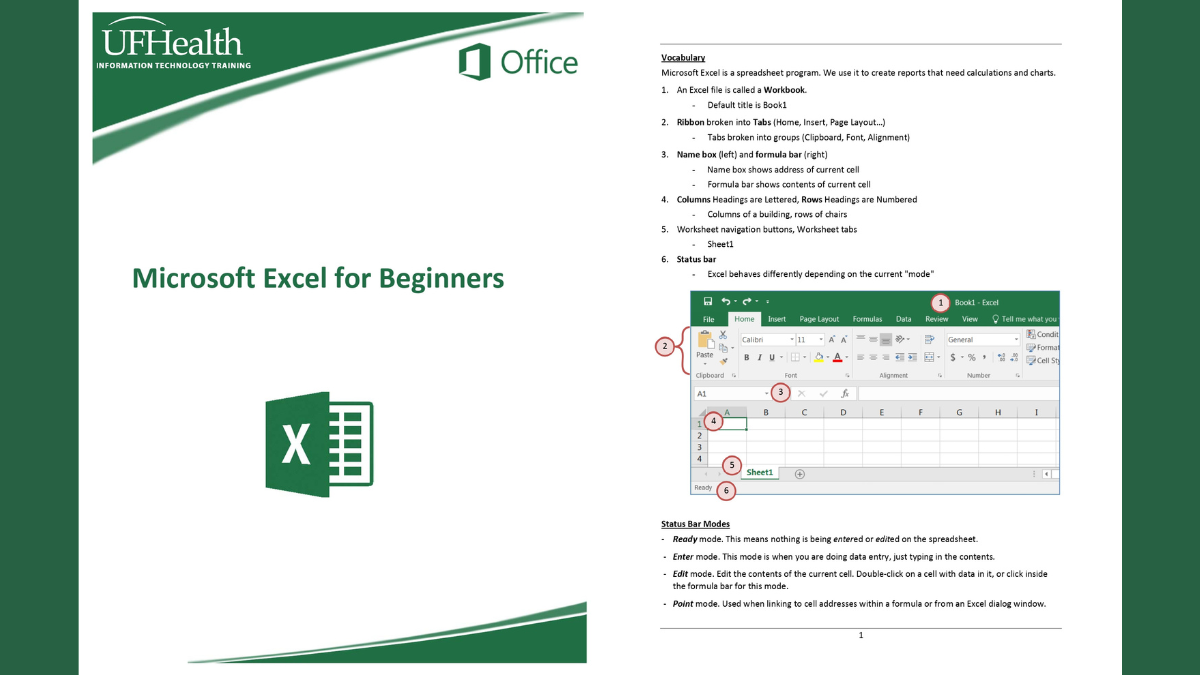
The PDF document we are offering is a well-structured guide providing a thorough introduction to Microsoft Excel. It is tailored specifically for beginners and covers all the essential features and functionalities you need to know to get started. The document is easy to follow, with step-by-step instructions and illustrative screenshots.

The Content
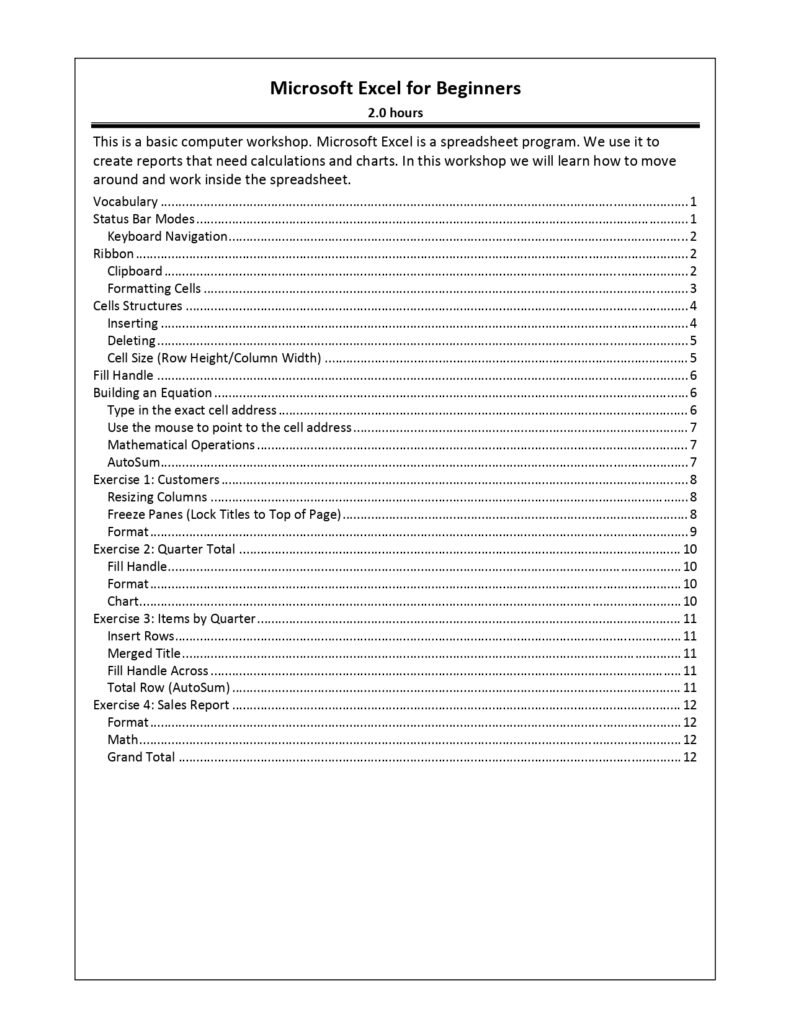
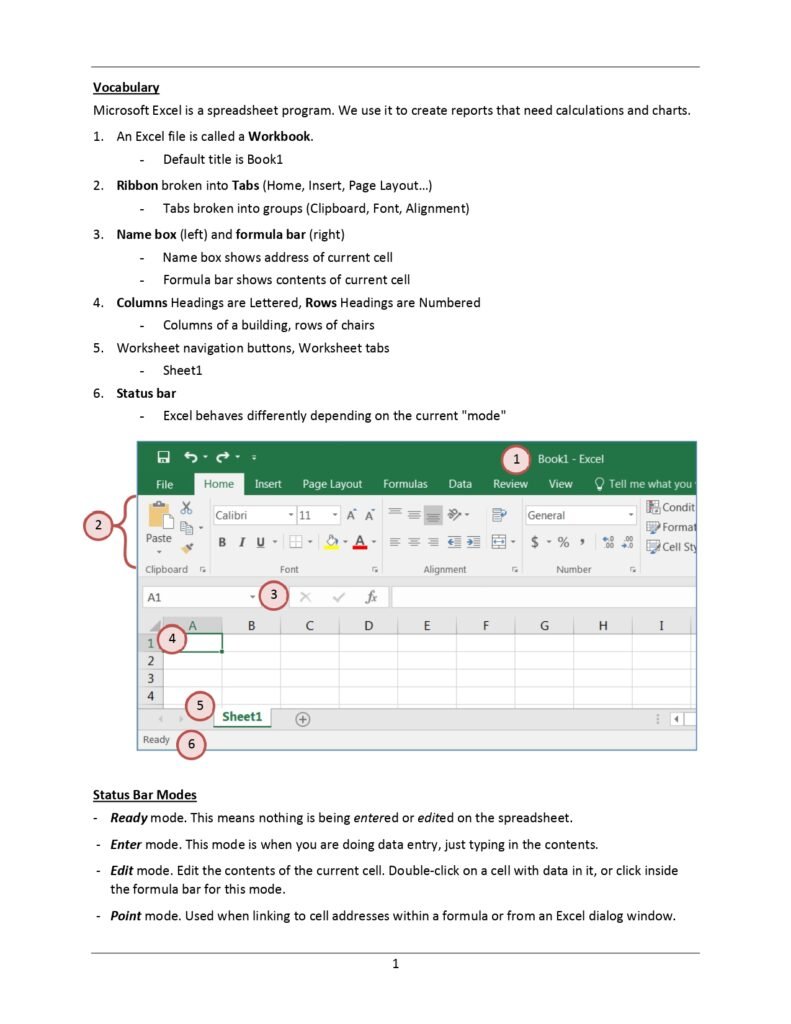
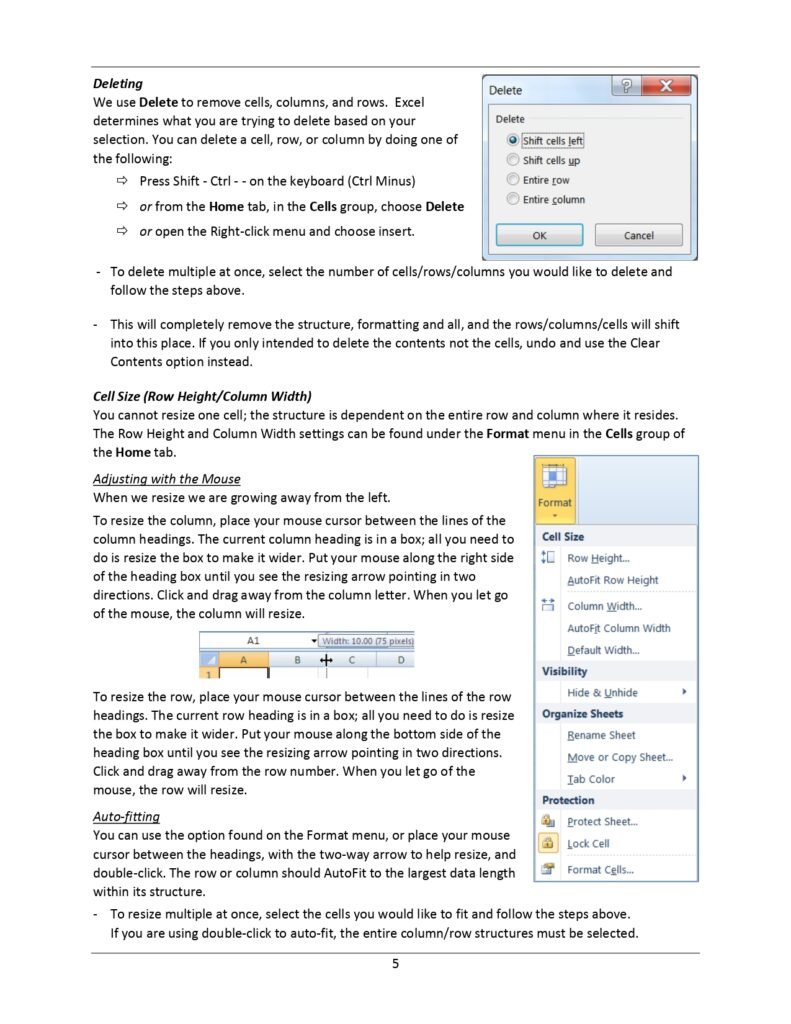
This is a basic computer workshop. Microsoft Excel is a spreadsheet program. We use it to create reports that need calculations and charts. In this workshop we will learn how to move around and work inside the spreadsheet.
- Vocabulary
- Status Bar Modes
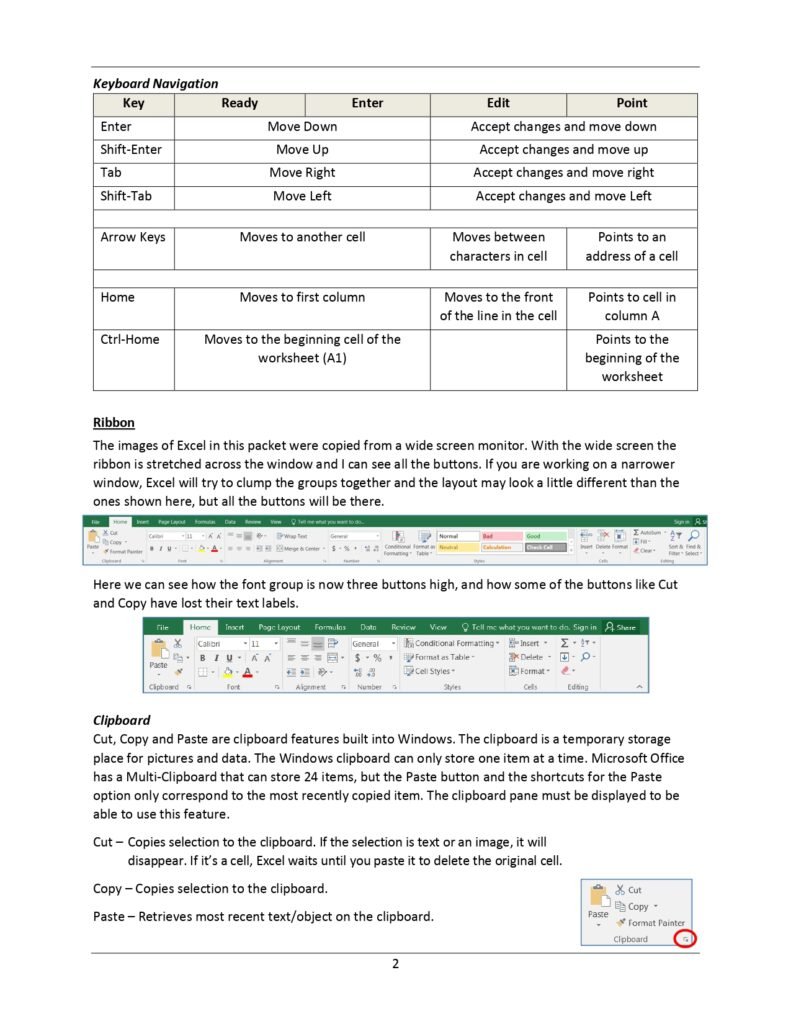
- Keyboard Navigation
- Ribbon
- Clipboard
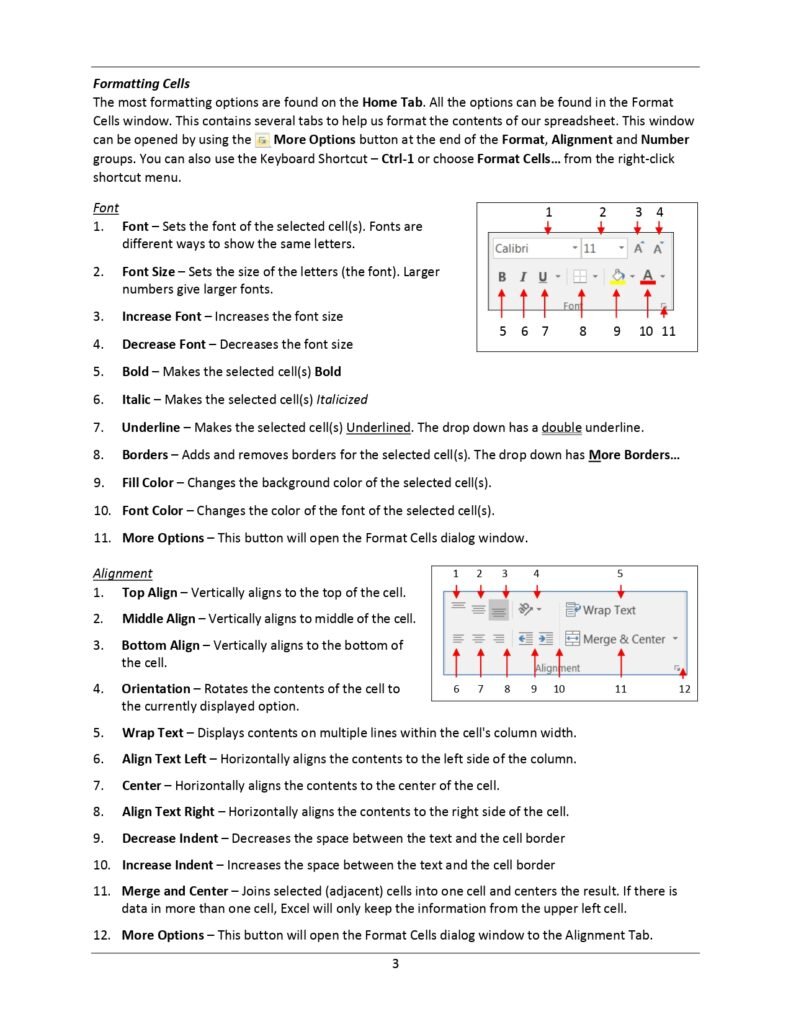
- Formatting Cells
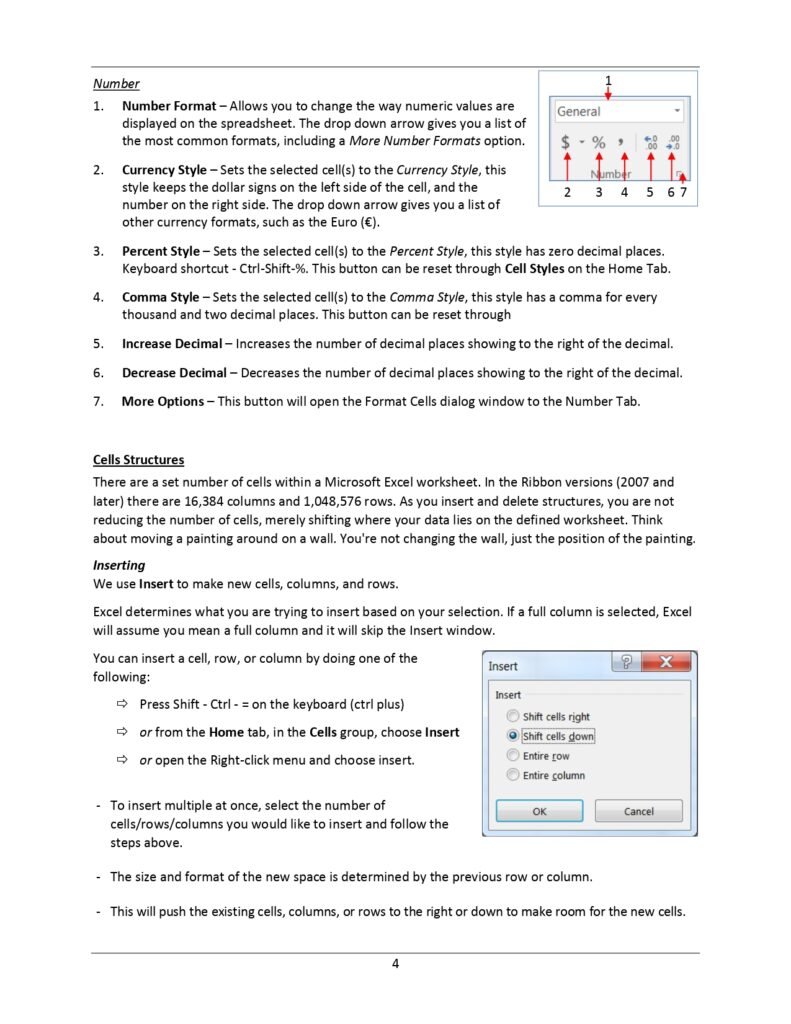
- Cells Structures
- Inserting
- Deleting
- Cell Size (Row Height/Column Width)
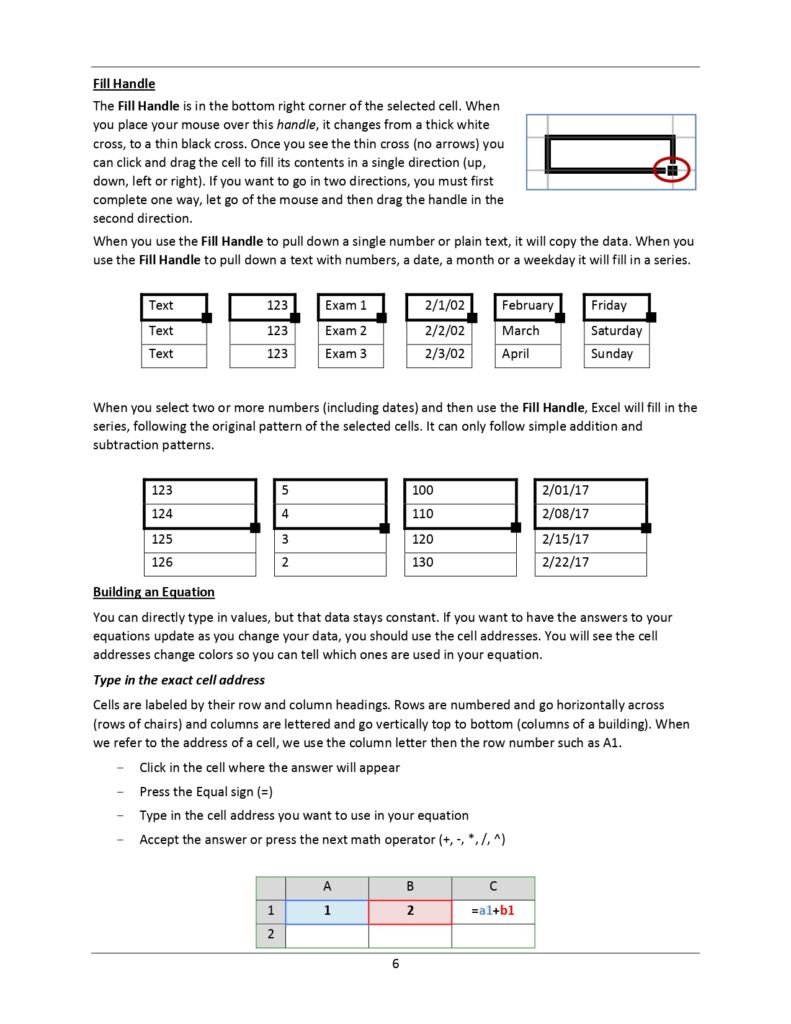
- Fill Handle
- Building an Equation
- Type in the exact cell address
- Use the mouse to point to the cell address
- Mathematical Operations
- AutoSum
- Exercise 1: Customers
- Resizing Columns
- Freeze Panes (Lock Titles to Top of Page)
- Format
- Exercise 2: Quarter Total
- Fill Handle
- Format
- Chart
- Exercise 3: Items by Quarter
- insert Rows
- Merged Title
- Fill Handle Across
- Total Row (AutoSum)
- Exercise 4: Sales Report
- Format
- Math
- Grand Total
Why the Document
There are numerous reasons why this PDF is an excellent resource for beginners:
- Comprehensive yet concise content
- Easy-to-follow instructions
- Visual aids to enhance understanding
- Practical examples to apply learning
- Completely free to download
Whether you are a student, a professional, or someone looking to enhance your spreadsheet skills, this guide will be invaluable in your learning process.
Your First Hour in Excel: A Beginner’s Walkthrough
New to Excel? Follow these steps with a blank workbook open. In about an hour you will build a small, useful spreadsheet: a monthly budget.
Step 1: Learn the words Excel uses
| Term | Meaning |
|---|---|
| Workbook | The Excel file (.xlsx) |
| Worksheet (sheet) | One tab inside the workbook |
| Cell | One box, named by column letter and row number, e.g. B3 |
| Range | A group of cells, e.g. B2:B10 |
| Formula bar | The bar above the grid that shows what is really inside the active cell |
| Ribbon | The toolbar of tabs (Home, Insert, Formulas, Data…) at the top |
Step 2: Enter your data
- In A1 type Item, in B1 type Budget, in C1 type Actual.
- From A2 down, type a few expenses: Rent, Food, Transport, Internet, Other.
- Enter amounts in columns B and C. Press Enter to move down and Tab to move right.
Step 3: Your first formulas
- In B7 type
=SUM(B2:B6)to total the budget. Copy it to C7 with Ctrl + C and Ctrl + V; Excel adjusts it to=SUM(C2:C6)automatically. - In D1 type Difference, and in D2 type
=B2-C2. Drag the small square at the bottom-right corner of D2 (the fill handle) down to D7 to copy the formula.
Every formula starts with an equals sign. If you see the formula text instead of a result, check that it begins with =.
Step 4: Make it readable
- Select the header row and press Ctrl + B for bold.
- Select the amounts and apply a currency format from Home › Number.
- Double-click the line between column letters to auto-fit the width.
- Add a simple highlight: Home › Conditional Formatting › Highlight Cells Rules › Less Than… 0 on column D shows overspending in red.
Step 5: Add a chart
Select A1:C6 and press Alt + F1. Excel inserts a column chart comparing budget and actual for each item. Click the chart title to rename it.
Step 6: Save and print
- Press Ctrl + S and choose a location. The default .xlsx format is right for almost everything.
- To print on one page, go to File › Print and choose Fit Sheet on One Page under Scaling.
Beginner mistakes to avoid
- Typing numbers as text (for example with spaces or a currency word). Excel cannot calculate with them.
- Merging cells inside data tables. It breaks sorting and filtering.
- Typing totals by hand instead of using formulas. They will be wrong as soon as a number changes.
- Leaving blank rows in the middle of a list. Excel treats the parts as separate tables.
Frequently Asked Questions
Is Excel hard to learn for beginners?
No. The basics (entering data, simple formulas, formatting and charts) can be learned in a few hours. Like any tool, it gets easier with regular practice on your own data.
Can I use Excel for free?
Yes. Excel for the web is free with a Microsoft account and covers the basics in this guide. The desktop app is part of Microsoft 365.
Related guides
Conclusion
In conclusion, our Microsoft Excel for Beginners PDF is designed to provide you with a solid foundation in Excel. It covers all the basic functionalities you need to start using Excel efficiently and effectively. Download the document today and start your journey towards becoming proficient in Excel.
Download PDF
To download the Microsoft Excel for Beginners PDF, click on the link below: